
Azure Migration Checklist: Steps for a Smooth Transition
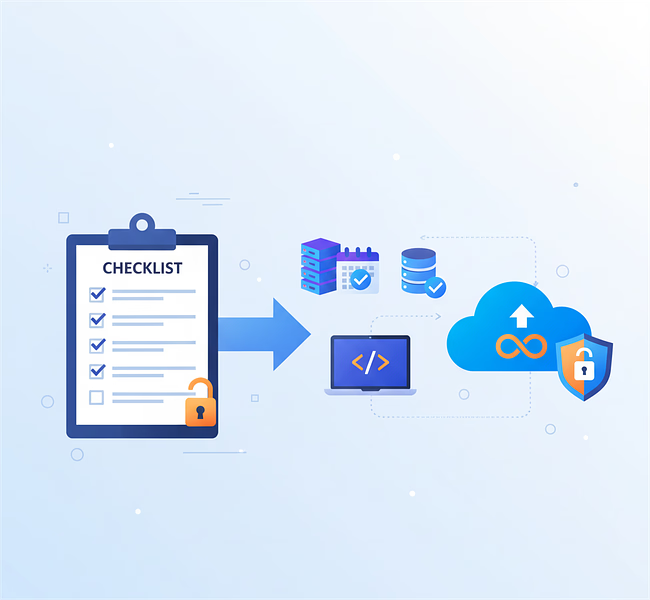
For many businesses, there are strong reasons to migrate data and applications from traditional systems to the Azure cloud environment. From improved functionality and seamless integration with Microsoft’s ecosystem to greater flexibility in services and data management, Azure offers clear advantages. It also helps enterprises simplify the complexities of infrastructure management.
However, without a well-structured migration strategy, organizations risk delays, unexpected costs, and potential security challenges. This is where an Azure migration checklist becomes invaluable. Acting as a step-by-step guide, it minimizes risks, streamlines the process, and ensures a smooth transition.
In this article, we’ll walk you through the key phases of an Azure cloud migration checklist from defining your goals to optimizing performance post-migration so your business can move to the cloud with clarity and confidence.
Table of Contents
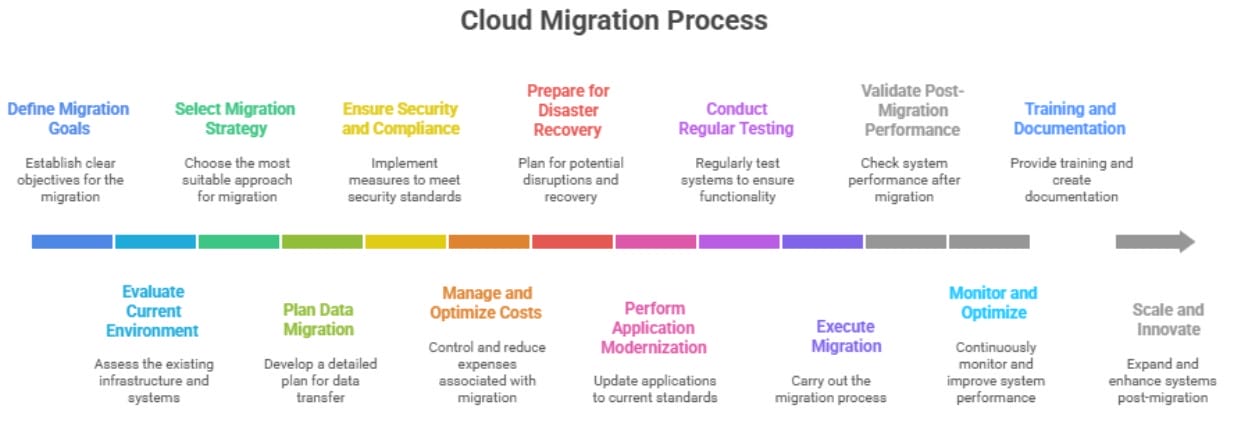
- Define Your Migration Goals
- Evaluate Your Current Environment
- Select the Right Migration Strategy
- Plan Your Data Migration
- Ensure Security and Compliance Standards
- Manage and Optimize Costs
- Prepare for Disaster Recovery
- Perform Application Modernization
- Conduct Regular Testing
- Do the Migration
- Validate Post-Migration Performance
- Monitor and Optimize
- Training and Documentation
- Scale and Innovate
- Conclusion
Define Your Migration Goals
One of the most successful tips for migrating to Azure is to define your migration goals. The enterprise must have a complete idea about the reason behind this transition. Some of the objectives could be:
Cost Savings
Identify places where you will be able to save money. Make use of Azure’s pay-as-you-go pricing model to get rid of old on premise infrastructure.
Scalability
Find out how Azure’s scalability feature will bring down the workload. Plan for auto-scaling measures to maintain optimal performance during peak and off-peak times.
Improved Security
List the security improvements you want to make in Azure, like network security groups, the Azure Security Center, and encryption methods.
Evaluate Your Current Environment
The next step is to evaluate the current IT environment of your enterprise. A full review of your current IT setup is the most important part of a successful move. This evaluation helps to make the right choice of what data needs to be collected and what should be left out.
List of Applications
Start by making a full and organized list of all the programs that are currently running on your own servers. As part of this process, you should write down the technological stack and dependencies that are used.

Data Inventory List
Take the time to find and list all of your organization’s data sources. Keep track of things like the type of data, its format, and where it is stored. Also, keep track of how much data there is and how it grows over time.
Sustainability
If your company is working on ESG (Environmental, Social, and Governance) projects, you can use the Azure Sustainability Calculator to keep track of how much carbon cloud use is releasing. This allows businesses to reach their sustainability goals.
Select the Right Migration Strategy
When it comes to the Microsoft Azure migration strategy, you need to focus on which strategy should be used. There are different strategies, including-
Rehost (Lift and Shift)
With this strategy, you can move apps and other data to Azure with minimal modification. The entire process helps in faster deployment and also costs less. For companies wanting to shift from a traditional IT system to the Microsoft Azure system, this process is best advised.
Reorganize
You don’t have to totally rewrite apps to add Azure services to them. It requires a small alteration, making it cost less and work better. It also allows businesses to update their systems seamlessly.
Re-design
Change the way apps are built so that they can grow, change, and be more reliable in Azure. This method lets companies use cloud-native features, which makes them more flexible in the long term.
Plan Your Data Migration
Another important point to consider is to plan the data migration because everything should be done under proper rules. Here are some ways to plan-
Data Classification
Use powerful data classification techniques to automatically tag and group sensitive information, making sure it is protected in the right way according to compliance rules. This proactive strategy makes it easier to enforce security and stops data from being misused.
Data Backup
This is the most important part, as without backing up your data, you might lose some in case of any mishap. So the best is to have a full backup plan that includes regular snapshots and copies of important data.
Ways to Move Data
Depending on the type and amount of work, choose the best way to move data. There are different tools, including Azure Data Factory, Azure Data Migration Service, and Azure Data Box.
Ensure Security and Compliance Standards
As part of the migration from the current IT system to Microsoft Azure, the enterprise needs to ensure that all the standard compliance is followed. Here is what you can do-
Identity and Access Management
To do this, make use of Azure Active Directory (Azure AD), which will help you manage user identities from one place and set up role-based access controls (RBAC).
Security Policies
Create Azure policies that ensure all of your resources and subscriptions comply with standards. You can make use of Azure Security Center to find and fix threats.
Compliance Frameworks
Check if the migration rules meet the compliance standards that are specific to your industry (such as GDPR, HIPAA, or ISO 27001).
Manage and Optimize Costs
One of the reasons why enterprises choose to adopt Microsoft Azure is its low-cost feature. It is important to do regular cost analysis. Make use of the Azure Cost Management and Billing feature to automate your expense tracking and billing system.
Moreover, irrespective of the cost you are spending on migration purposes, it is important to keep a tab on and know the right cost. The best way is to use the Azure Pricing Calculator, which is easy to use and gives a clear picture of the spending required.
Prepare for Disaster Recovery
During or after the migration process, a business may run across challenges that it didn’t predict. The best approach to deal with it is to have a plan in place. One of the best ways to detect weaknesses in the disaster recovery plan is to make sure the system is ready to undertake regular failover simulations.
Perform Application Modernization
Moving to Azure gives you a chance to update your apps, which will make them run faster and more efficiently.
Containerization
Put your programs in containers with Docker and then use Azure Kubernetes Service to take care of them. This will make them easier to move about, more adaptable, and faster to set up.
Microservices
To make microservices, split up monolithic apps into smaller, separate, and scalable pieces.
Use PaaS to make maintaining infrastructure easier. Move workloads to Azure’s Platform as a Service (PaaS) services, such as Azure App Service. PaaS makes it easier to come up with new ideas, makes things more stable, provides built-in scalability, and lowers the cost of running a business.
Update Database
You can move existing databases to new Azure solutions like Azure SQL Database or Cosmos DB. These platforms are faster, more reliable, and easier to scale up around the world.
Conduct Regular Testing
Testing is a vital part of any IT work. So, as you start the Azure migration process, think about testing each step. It’s crucial to create test environments that are exactly like the ones that are utilised in production.
Do the Migration
Now it’s time to do the migration, which is the most crucial component. You need to carefully plan and keep an eye on the whole process here. Plan migrations in waves, starting with less important workloads for initial testing to reduce the chance of problems.
Validate Post-Migration Performance
After the migration is done, you should keep an eye on how things are going. It is one way of giving a validation of the proper process and gives confidence to the staff to use it correctly.
Monitor and Optimize
Optimization is part of the long-term process that happens after relocation. For this process, you can make use of Azure Monitor and Application Insights, which will give you a real-time update on how resources are being used, minimize costs, and automatically make the process better for the IT service.
Training and Documentation
Teams can only handle a migration well if it goes well. Training your IT workers and keeping records of everything for future reference are both highly critical. Further, there will be no gaps in the data migration.
Scale and Innovate
The idea behind switching to Microsoft Azure is to get bigger and end complex data settings. To get new strategies and new ideas, make use of Microsoft Azure AI, analytics, and IoT. This will allow you to stay ahead in the business and be updated too.
Conclusion
Migrating to Microsoft Azure can be quite complex and requires planning. This complete Azure migration checklist will help you get ready for the migration process and make it go more smoothly. However, having a partner who can help with the migration smoothly is always a good idea.
At Ansi ByteCode LLP, we help enterprises switch over to cloud products like Microsoft Azure and push their business into a new horizon through expert advice and assistance.
Ready to move your business to the cloud? Hire Azure Developer or Contact Us today to get started.

At Ansi ByteCode LLP, a visionary leader spearheads our journey from dream to reality. Soft-spoken yet immensely powerful, he embodies effective leadership, leveraging his developer background to navigate complexities effortlessly.


