AI Agent Orchestration Services

Connect your AI agents to complete workflows, share context, and keep people in control.

Your AI agents can complete tasks. But can they work together? Separate agents often leave teams managing handoffs themselves. Context gets lost, and responsibility becomes unclear across systems.

Our AI agent orchestration services bring that work together. We coordinate tasks, preserve context, and manage approvals across platforms. For US enterprises, Ansi ByteCode LLP combines Microsoft Solutions Partner credentials with enterprise software delivery experience spanning over twelve years.

+
Years in AI & Software Development
+
AI & Software Projects Delivered
+
Certified AI & Technology Experts
%
Client Retention Rate

Why AI Agents Need Orchestration

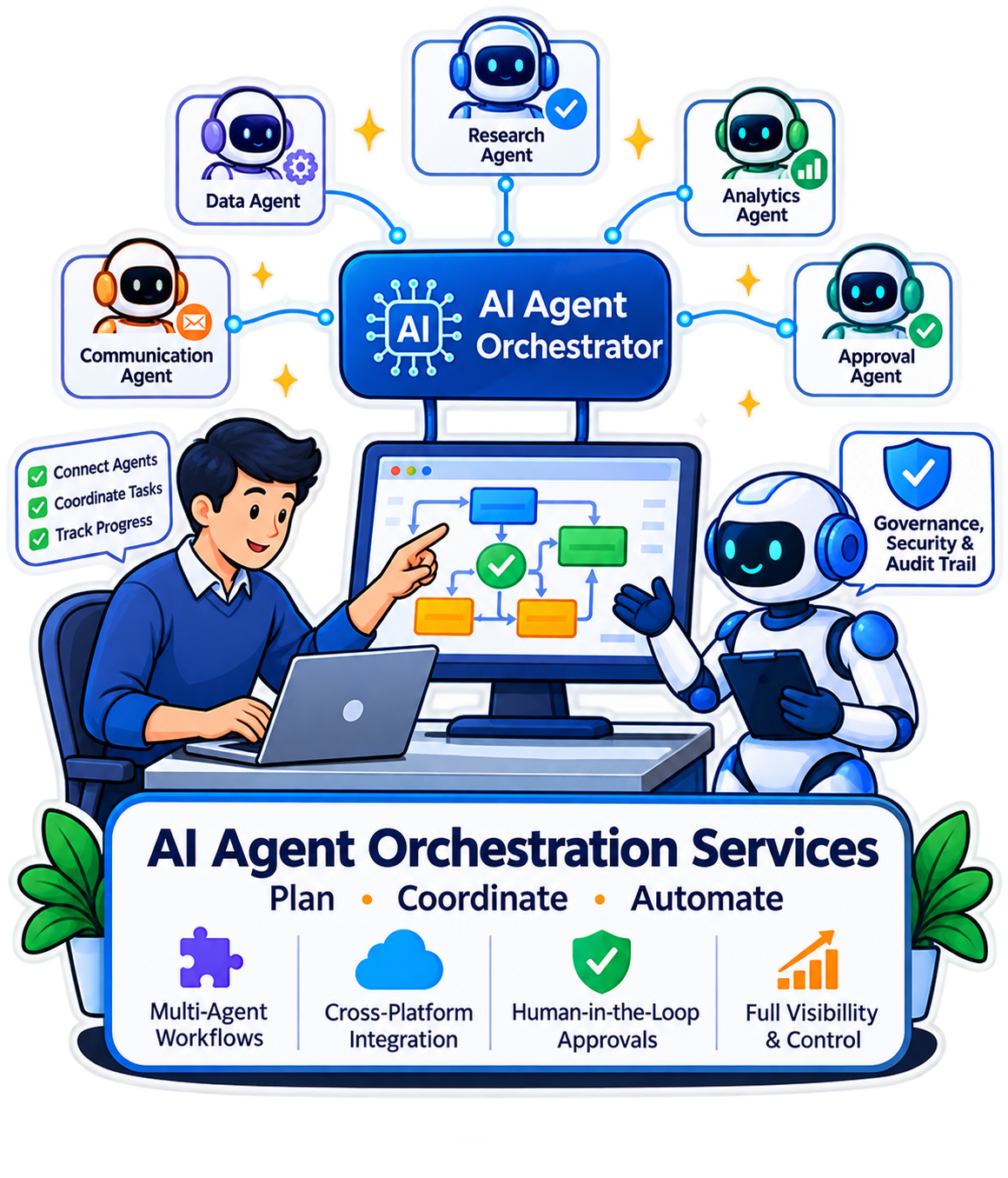
AI agent orchestration coordinates specialized agents, tools, and people within one business process. A coordination layer routes tasks, shares context, and enforces workflow rules. This becomes useful when agents depend on each other’s work. Without clear coordination, the following problems can affect delivery, oversight, and operating costs.

Duplicate AI Agents and Unclear Responsibilities

Different teams may deploy agents for overlapping tasks. Without a shared inventory, duplicate work becomes difficult to spot. Ownership also becomes unclear when several agents contribute to one outcome, leaving teams unsure who should resolve errors.

Context Lost Between Handoffs

A handoff can lose customer details, earlier decisions, or unfinished work. The next agent then works with incomplete information. People repeat explanations, while teams spend time rebuilding context that should have traveled with the task.

Single Agents Hit a Ceiling

One agent becomes harder to manage as instructions and tools accumulate. Specialist agents may help when responsibilities separate clearly. However, splitting tasks also adds coordination overhead, so multiple agents need a practical justification.

No Audit Trail for Automated Decisions

Separate logs may show actions without explaining the complete workflow. Reviewers need to know which agent acted and what information it used. Missing approval records and context make investigations and compliance reviews harder.

Unpredictable Cost and Runaway Loops

Repeated model calls, failed handoffs, and circular exchanges can increase spending. Without workflow limits, agents may continue without useful progress. Teams need visibility into retries, token usage, and the cost of completing each task.

Pilots That Never Reach Production

A demonstration rarely captures every permission issue or business exception. Production workflows need recovery paths, integration testing, and clear ownership. Without these foundations, teams can struggle to turn a promising pilot into a dependable service.

Our AI Agent Orchestration Services

We connect agents, systems, and people around your business processes. Our AI orchestration services start with existing workflows and identify where coordination adds measurable value.

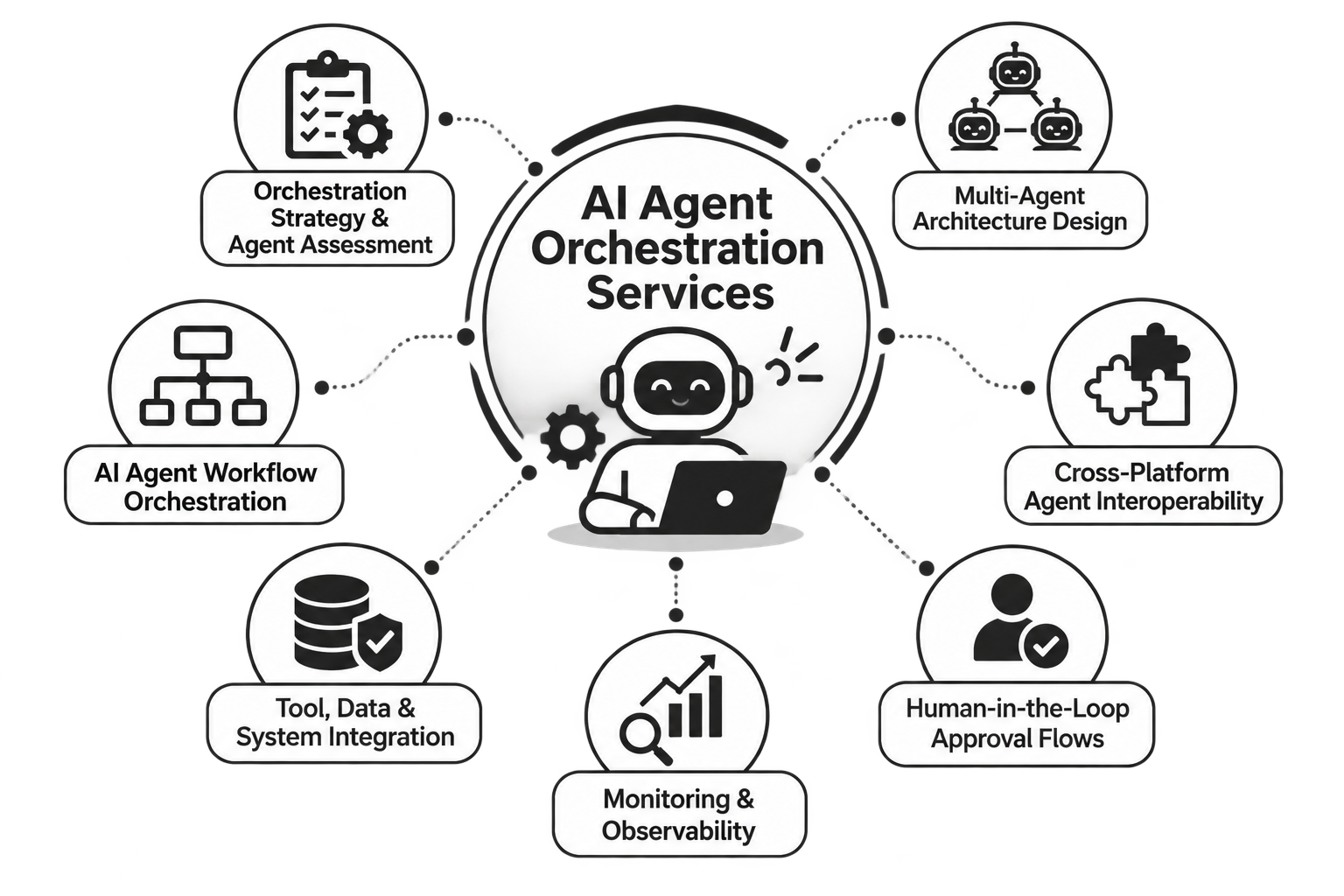
Orchestration Strategy and Agent Assessment

We inventory Copilot, Agentforce, ServiceNow, custom agents, and Power Automate flows. Then we map their responsibilities, dependencies, and process ownership. The assessment identifies where orchestration could justify its cost. It also highlights where one agent or a conventional workflow would meet your needs more simply.

Multi-Agent Architecture Design

We design multi-agent AI orchestration around clear responsibilities and handoffs. Each agent gets defined boundaries and access to relevant context. We choose coordination patterns and plan how workflows retain state. Before development, we establish who handles failures and how interrupted work resumes or reaches a person.

AI Agent Workflow Orchestration

Our AI agent workflow orchestration connects sequential and parallel tasks. Events, schedules, or user requests can trigger these workflows. We combine agent frameworks with Azure Durable Functions or Logic Apps where appropriate. Saved workflow state helps processes recover after interruptions. Retry rules reduce the risk of repeating completed actions.

Cross-Platform Agent Interoperability

We connect agents through supported interfaces and defined inputs and outputs. Copilot Studio can pass work to Agentforce or ServiceNow where integration capabilities allow. Our AI agent service orchestration uses Agent2Agent (A2A), APIs, or adapters. The approach depends on platform support, available permissions, and authentication requirements.

Tool, Data and System Integration

We give agents controlled access to CRM, ERP, SharePoint, Dynamics 365, SAP, and internal APIs. Tool calling and Model Context Protocol (MCP) servers connect supported systems. Each agent receives only the permissions its tasks require. Our RAG development services support document grounding where workflows need reliable source retrieval.

Human-in-the-Loop Approval Flows

We define checkpoints around risk, confidence, and business rules. Sensitive actions go to a named reviewer or Teams channel. Supporting context helps reviewers make informed decisions without retracing earlier steps. After approval, workflows resume from their saved state. These controls support oversight alongside wider security and compliance requirements.

Agent Governance and Security

We design agent identities, role-based permissions, and data boundaries early. Microsoft Entra Agent ID supports identity management where applicable. Controls address prompt injection, tool misuse, and unsafe outputs. We configure supported Microsoft Purview capabilities alongside application logging. Together, these capture relevant workflow activity and approval records for review.

Observability, Evaluation and Cost Control

We trace agent actions and tool calls using OpenTelemetry where supported. Evaluation checks task completion, handoff accuracy, and recovery from failures. Limits help detect loops and excessive retries. From the first month, reporting tracks token usage, workflow costs, and cost per completed task against agreed quality measures.

Managed Orchestration Support and Framework Migration

We monitor live workflows and investigate failures after launch. Changes are assessed before adding agents or upgrading models. For Semantic Kernel or AutoGen projects, we evaluate Microsoft Agent Framework migration where beneficial. Support includes regression checks, integration updates, and documentation that helps your team maintain the orchestration.

Get More From Your AI Agents

Improve coordination between AI agents, reduce repeated work, and maintain clear oversight as your operations grow.

Industries We Serve

Industry requirements shape how agents share information and escalate decisions. We design coordination around the systems, access controls, and review responsibilities involved in each workflow.

Healthcare

Connect prior authorization, referral routing, and patient communication workflows. Apply access controls designed around HIPAA requirements, with qualified staff reviewing clinical outputs before use.

Finance and Banking

Coordinate KYC checks, onboarding reviews, and fraud investigations. Carry evidence between specialist agents, with recorded actions and human decisions available for internal review.

Insurance

Connect claims intake, coverage checks, and fraud indicators before adjuster review. Preserve supporting documents and case history as work moves between agents and claims teams.

Manufacturing

Coordinate quality, maintenance, and procurement agents around plant information. Route purchase requests within approval limits. Plant teams review recommendations before changes affect equipment operation.

Logistics and Supply Chain

Coordinate shipment records, customs documentation, and customer updates across transport systems. Keep information consistent as work moves between carriers, warehouse teams, and service staff.

SaaS and Technology

Coordinate support, documentation, and release agents across ticketing systems, repositories, and knowledge bases. Keep published guidance aligned with approved product changes and release decisions.
AI Agent Orchestration Use Cases

Start with a business process that has clear handoffs and outcomes. These examples show how specialist agents and conventional automation can work within one controlled workflow.

Customer Service Triage and Resolution

An intake agent classifies requests and routes billing, order, or technical questions. Low-confidence responses and sensitive cases move to staff, with conversation history and attempted resolutions attached.
IT Service Desk Automation

Agents gather diagnostics, check known fixes, and query ServiceNow or Jira. Approved workflows handle access changes, while unresolved incidents reach technicians with troubleshooting evidence already attached.

Finance Operations and Accounts Payable

Coordinate invoice extraction, three-way matching, exception review, and ERP posting. Combine agents with rules-based checks, routing discrepancies and payments above agreed limits to the appropriate approver.

Sales Proposals and RFP Responses

Research and drafting agents assemble responses from approved submissions and product information. Pricing and compliance checks follow, with staff reviewing commitments before the proposal goes out.

Employee Onboarding and HR Requests

Coordinate account provisioning, equipment requests, training assignments, and policy queries across HR, IT, and facilities. Track dependencies so unfinished steps reach the responsible team before joining dates.

Supply Chain Exception Handling

Monitor inventory shortfalls or supplier changes, then assess available responses. Planning agents compare alternatives, while communication agents draft updates for approval before teams commit to revised arrangements.

Multi-Agent Orchestration Patterns We Implement

The right pattern depends on the process and its constraints. Framework choice follows those needs. Workflows can combine patterns, with separate decisions about task order, delegation, shared context, and the events that start execution.

Supervisor (Orchestrator-Worker)

A lead agent breaks a request into tasks and assigns specialists. It then checks and combines their results. This suits open-ended work, such as customer research, where the required steps may vary between requests.

Sequential

Agents work in a fixed order, passing outputs forward. Document checks might run before approval and publication. Each stage checks its inputs before continuing, helping teams catch errors before they affect later work.

Concurrent

Several agents examine the same input at once. Their findings are then compared or combined through defined rules. This supports vendor assessments and risk reviews that benefit from different perspectives, while reducing unnecessary waiting between independent tasks.

Handoff

Control passes to the agent best suited to the next task. Relevant history and workflow state move with it. In customer support, a general inquiry can become a specialist billing case.

Group Chat

Agents collaborate within a shared conversation managed by a moderator. A person can join where review is needed. This suits drafting and critique, provided clear turn limits and completion rules keep the discussion focused.

Event-Driven

A system event or schedule starts the workflow. This suits monitoring, reconciliation, and overnight processing. Events can start sequential, concurrent, or other coordinated workflows. The trigger determines when work begins, rather than how agents collaborate.

Our AI Agent Orchestration Process

We test system connections and access requirements before development progresses. Business owners help define approvals, exceptions, and acceptable results. These decisions guide implementation and give testing a clear basis for judging readiness.

Step 1: Process Discovery and Agent Inventory

We map the process, existing agents, systems, and owners. Together, we define the desired outcome and current baseline. This establishes whether orchestration is warranted and which workflow should be addressed first.

Step 2: Orchestration Architecture and Pattern Selection

We choose coordination patterns and define agent responsibilities. Identity, data boundaries, and approval requirements enter the architecture here. We also plan state management, recovery paths, and the interfaces needed between systems and agents.

Step 3: Agent, Tool and System Integration

We connect agents to approved tools and business systems. Defined inputs, outputs, and permissions guide each integration. We also implement conventional workflow steps where fixed rules provide more predictable handling than agents.

Step 4: Governance, Guardrails and Human Approval Design

We implement and validate the controls agreed during architecture. These include access restrictions, escalation thresholds, approval routing, and audit records. Business owners confirm which actions require review and who can approve them.

Step 5: Testing, Evaluation and Load Simulation

We test realistic requests, incomplete data, failed integrations, and unexpected outputs. Evaluation covers task quality, handoff accuracy, recovery, and cost. Load simulation checks how the workflow behaves as demand and concurrency increase.

Step 6: Deployment, Monitoring and Continuous Optimization

We deploy through agreed release controls and monitor live performance. Traces and evaluation results guide improvements. New agents, models, and workflow changes are tested against the baseline before they enter production environments.

Industry Recognition

Why Businesses Choose Ansi ByteCode LLP for AI Agent Orchestration Services

Your team needs to maintain workflows after launch. That means understandable code, documented integrations, and clear ownership. We build around your existing environment and measure whether completed tasks meet agreed quality and cost targets.

Microsoft Solutions Partner

Our Microsoft Solutions Partner designations cover Data & AI (Azure), Infrastructure (Azure), and Digital & App Innovation (Azure), supporting our Microsoft-focused enterprise delivery capabilities.

Orchestration Inside Your Microsoft Tenant

Where requirements fit, we build using Copilot Studio, Microsoft Foundry, and Azure. We configure identity, access, and deployment boundaries around your approved Microsoft environment.

Built for .NET and Python Teams

Microsoft Agent Framework supports .NET and Python development. Documented integrations and handover materials help your developers maintain workflows within familiar development environments after launch.

Not Locked to One Vendor

We use MCP, A2A, LangGraph, or CrewAI where appropriate. Supported interfaces help connect platforms, while architecture decisions make dependencies and future migration requirements clear.

Governance From the First Design Session

Identity, permissions, approval gates, and audit requirements enter the architecture early. These decisions guide implementation, rather than being added after the workflow is built.

Cost and Quality Measured per Workflow

Tracing and evaluations track completion quality and cost per task. Comparing these results with your operational baseline helps assess whether the workflow delivers sufficient value.

10+ Years of Enterprise Delivery

Ansi ByteCode LLP has delivered enterprise software since 2014. That experience informs how we approach system integration, business exceptions, deployment, and ongoing change management.

AI Agent Orchestration Tech Stack

We select technologies around your existing systems, security requirements, and development skills. The stack supports agent coordination, reliable workflows, controlled access, and ongoing monitoring.

GPT (OpenAI)

Claude

Gemini

Llama

Mistral

DeepSeek

Cohere Command

Qwen

LangChain

LangGraph

LlamaIndex

CrewAI

AutoGen

Semantic Kernel

OpenAI Agents SDK

DSPy

Microsoft Copilot Studio

Pinecone

Weaviate

Milvus

Chroma

Qdrant

FAISS

Redis Vector

Elasticsearch

Python

TypeScript

JavaScript

C# Logo

C#

Java

Go

LangSmith

Langfuse

Arize AI

TruLens

Guardrails AI

NVIDIA NeMo Guardrails

OpenTelemetry

Docker

Kubernetes

Helm

Terraform

GitHub Actions

Case Studies

See how we’ve helped businesses across industries solve real challenges with AI, from strategy and integration to full-scale deployment and measurable results.

What our Clients say About us

Don't just take our word for it. Here's what businesses across the US say about working with Ansi ByteCode LLP as their AI consulting partner.

FAQs on AI Agent Orchestration Services

These answers explain how orchestration works, when multiple agents are useful, and what affects platform choice, security, and the cost of implementing a coordinated workflow.

Orchestration manages how AI agents complete work together. For example, one agent extracts invoice details, while another investigates discrepancies. The workflow passes relevant information between them and sends payment requests to a person for approval.

Agent development creates an agent’s capabilities, instructions, and tool access. Orchestration manages how agents work together. It handles task routing, shared context, workflow state, approvals, and failures across the wider process, including steps that use conventional automation.

Multiple agents can help when tasks need distinct expertise, permissions, or independent checks. Start with one agent or a conventional workflow where possible. Add agents when testing shows benefits that justify extra coordination, latency, and cost.

Copilot Studio suits many Microsoft business workflows. Microsoft Foundry supports more customized agent applications. Open-source frameworks offer additional architectural control. Choose based on integration needs, governance requirements, developer skills, and the effort your team can support.

Yes, where the platforms expose suitable interfaces and permissions. Connections may use A2A, APIs, or adapters. Feasibility depends on supported capabilities, licensing, authentication, and whether agents can exchange the context needed to complete the workflow.

Use defined agent identities, least-privilege access, controlled tool execution, and approval gates. Workflow logs should connect actions, inputs, outputs, and reviewers. Security testing also checks prompt injection, unintended data access, and failures between connected systems.

A focused first workflow typically costs $10,000 to $25,000. Multi-system enterprise orchestration usually runs $40,000 to $100,000+. Model usage, licensing and support are separate monthly costs.

Our Blogs

Explore our latest insights, guides, and expert perspectives on AI. This will help you stay informed and make smarter business decisions.

What Is Predictive Maintenance? How It Works and Why It Matters

Critical equipment doesn’t fail on schedule. A motor overheats without warning.

Agentic AI vs Generative AI: Which One Is Right Fit for You?

If you’ve been comparing Agentic AI vs Generative AI, you’re probably wondering which one can actually make a bigger difference to your business

Let’s build your dream together.